


When you need reliable, fast answers, you have to train a chatbot with your data. Generic models can be pretty intelligent-sounding, but they lack the necessary context. Consequently, they dish out hallucinations, leave the users frustrated, and cause unnecessary escalations. A chatbot trained with unique data provides accurate, relevant, and real-time answers. This guide will show you a clear, practical, step-by-step path.
To start with, you are going to learn how to clean and organize your data to ensure its accuracy. After that, you will discuss the best-proven training techniques that improve performance. Next, you will know how to test comprehensively, identify gaps, and refine outcomes. Lastly, you will find how to quantify real-world change and continually get better.
The correct process will allow you to turn a generic chatbot into a trusted and high-performing assistant that can produce customer satisfaction and workload reduction: you can start doing so today.
Why training your chatbot on custom data matters
Off-the-shelf models would give you a good starting point; however, they won’t have your domain-specific context. They tend to provide vague, incomplete, or incorrect answers without such a context. When customer service responds inaccurately, it wastes resources, loses valuable time, and erodes trust.
In comparison, however, when you teach your chatbot on the data specific to your company, it can provide hyper-precision, context-sensitive, and super-speedy responses. Consequently, you lower expensive escalations, first call problem resolution, and build customer confidence. Furthermore, such up-to-date training guarantees that your chatbot is aware of the terms used in the industry and of policy specifics and your brand voice, which is impossible to get using a generic model.
Briefly, having your chatbot trained with custom data will take it out of the box of a one-size-fits-all tool, and make it into a team member that reliably and performs well. By doing so, you have a more accurate solution and can also have a smarter/more reliable customer experience every single time.
What goes wrong when you don’t train chatbot on your data
One is in the form of inconsistent answers to users. Then chatbots hallucinate or make up policies. In the meantime, agents work more with the tickets and eliminate errors. Finally, your brand will be affected, and the prices will increase. Due to such facts, custom data is paramount in mission-critical applications.
Types of custom data to include
Provide product/service documentation, including manuals, feature lists, and release notes, to keep answers up to date. Embed company policy content to ensure internal knowledge bases contain content and SOP documentation such as troubleshooting, escalation procedures, and service-level rules. Activate support tickets and chat log data to include actual phrases and edge cases, and train the bot on how customers will ask questions. Add CRM and ordering records where possible, improve context, but delete or pseudonymize personal data. In the case of regulated industries, combining compliance and regulatory material (policies and legal text) ensures the safety and defensibility of responses. That is why linking all these diverse sources of data, you build a chatbot which provides correct, consistent, and reliable answers and still embodies the voice of your brand and operating standards.
Basic approaches to train a chatbot on specially prepared data
Each approach does not fit every need. Select the one to suit your intentions.
Retrieval-Augmented Generation (RAG)
RAG, on the other hand, collects snippets of the documents pertinent to a query. It then uses those snippets to condition the model to give answers. Apply RAG when your knowledge base is dynamic.
Parameter-efficient and fine-tuning
Training using labeled examples involves fine-tuning. It can work when you require uniformity or behavior. To reduce cost, use parameter-efficient methods on large models.
Hybrid: light fine-tuning + RAG
Mix in RAG to be fresh, light tuning to look good, and guardrails. This combination is an apt mixture of accuracy and adaptability.
Vector search, embeddings
Index text and make vectors in a vector database. Then apply the nearest neighbor search to retrieve other relevant material. The approach is readily applicable to a large corporation.
Step-by-step playbook: how to actually train chatbot
Below is an actionable checklist you can follow end-to-end.
1 — Audit and prioritize data
Map all data sources. Next, tag them by trust, freshness, and sensitivity. Prioritize sources that users request most. 
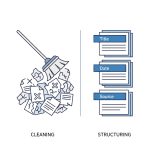 2 — Clean and structure content
Remove duplicates and old drafts. Chunk long documents into focused passages. Add metadata like title, date, and source.
 3 — Create high-quality training samples
If you fine-tune, craft conversational pairs. Use real queries paired with correct, concise answers. Include negative examples and edge cases.
 4 — Build embeddings and index
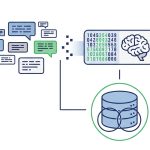
Choose an embedding model that matches your domain. Then set chunk sizes and index with a reliable vector DB. Tune retrieval top-k for quality.
 5 — Design prompt templates and system messages
Use system messages to set the agent’s role and strict behavior rules. For RAG, provide clear instructions to cite sources. Also instruct the bot to say “I don’t know” when appropriate.
 6 — Test offline with adversarial queries
Create a test suite that includes edge cases and tricky user inputs. Run unit tests to measure hallucination and relevance.
 7 — Deploy with A/B testing
Start small with a canary rollout. Compare metrics like containment rate and escalation rate against your control group.
 8 — Monitor and iterate
Collect post-deployment feedback. Use accepted answers to build active learning datasets. Re-index and retrain on a schedule.
Good practices and pitfalls
- Adhere to the following rules, and you can keep projects on track.
- Do use labeled clean samples. They enhance the behavior of a model in the shortest time.
- Implement human-in-the-loop revisions on sensitive cases.
- Version your datasets, and change records.
- Do not feed raw PII into training pipelines. Pseudonymize/redact first.
- Don’t overlook latency. Speed up retrieving and caching.
- Concept drift and stale content. Schedule updates.
How to measure success when you train a chatbot
Establish measures before commencing. After that, measure properly.
Correctness: intent and answer.
Containment rate: What percentage of unresolved issues were handled safely without people?
Deflection rate: decrease in channel loading.
Response latency: mean time of response in milliseconds.
CSAT / NPS: customer satisfaction and loyalty effect.
Hallucination rate: unsupported answers percentage.
You can use A/B tests to credit your advice and training changes.
Mini case studies and case use
Teams tangibly experience appreciation.
E-commerce: Availability and returns of the products
Digest the product catalog and termination policy. As a result, the bot answers stock and returns queries in real-time. Consequently, the agent load goes down and cashbacks take place promptly.
HR and IT help desk: access request and onboarding
Internal rules and an indecorous policy. Agents receive trustworthy feedback, and new staff are simpler to address.
Healthcare/clinical/SOAHFAQ (privacy-first)
A FAQ and guides to the care index. Use robust access control and compatible redacting. The approach gives a fast reference to clinicians without the disclosure of PHI.
Security, privacy, and compliance
The training pipeline must comply with laws governing the pipelines.
Protect data at rest and data in motion.
Limit the roles.
Before the indexing, mask or use a false name in personal data.
Continue training, access audit logs.
Be compliant with the likes of GDPR and HIPAA as required.
There is also retention of policy documents. Ensure that sensitive use cases receive approval from legal teams.
Scaling, on-going learning
When you have succeeded, expand sensibly.
Automatically ingest those sources that are constantly changing.
Use active learning to reveal new training instances.
Version datasets and change of model datasets.
You can trade latency against cost; they do that with caching and sharding.
Make an appointment for retraining frequency based on the drift cues.
When you strategize using scale, you do not have to undergo a drop in quality and miscellaneous costs.
Chatn.ai will help to train a chatbot on your data.
What aids this work is the tools offered by Chatn.ai. We integrate with Zendesk, Slack, Confluence, and standard CRMs. Then we provide ingestion pipelines that are cleaned and chunked. Moreover, we use the embedding pipelines and multi-vector databases. We also have a human-in-the-loop tool that speeds up labeling and quality review. Finally, KPIs, such as including the number of latency and hallucination events, and containment, are observed by our monitoring dashboard.
To conclude, Chatn.ai offers ready-made production components. Teams are therefore able to save time to appreciate and avoid common mistakes.
Conclusion and call to action
Custom data training provides instant and correct answers to your chatbot. You, in turn, would have fewer escalations and increase customer satisfaction. In addition, you safeguard brand confidence and reduce operational expenses. Use a small, consistent dataset and work around it with RAG or hybrid procedures. Say you are ready to go, but at a faster pace, Chatn.ai offers connectors, pipelines, and monitoring capabilities that aid in productionizing results. Are you prepared to see results? Ask about a data audit, begin a free trial, or download our training checklist now.
Frequently Asked Questions (FAQ)
How long does it take to train a chatbot with custom data?
It depends. A minimal RAG setup can run in days. Large fine-tuning projects can take weeks.
Do I always need to fine-tune models?
No. RAG plus strong prompts often works well. Use fine-tuning for consistent voice or edge capabilities.
How do I handle PII during training?
Redact or pseudonymize personal data. Store originals securely and log all access.
What vector DB should I use?
Benchmark by latency, durability, and feature set. Popular options suit different scales.