

Today, customers expect instant responses, accurate information, and excellent support, emphasizing the need for service teams to meet these expectations effectively. However, managing increasing customer requests with limited resources is challenging for many service teams. As a result, routine tasks can consume valuable employee time. Employees may answer inquiries, update records, verify orders, transfer tickets, and manage follow-ups. Although these tasks seem small individually, they can quickly increase the team’s workload.
This is where AI Service Automation becomes valuable. Modern automation does more than provide instant responses. It helps businesses understand customer requests, find relevant information, initiate workflows, and resolve issues faster. Moreover, businesses can connect customer interactions to internal processes to achieve more integrated service operations. Therefore, they can reduce repetitive work while improving efficiency and response times, leading to better customer experiences.
However, automation should not remove the human element. Instead, businesses can automate routine tasks, empowering employees to focus on complex customer needs. Consequently, teams can deliver faster, more personalized, and more effective customer service, making their roles more impactful.
What Is AI Service Automation?
AI Service Automation refers to the use of artificial intelligence to automate customer service tasks, decisions, and workflows. This technology simplifies management for businesses and speeds up service delivery. In traditional automation, specific rules are strictly followed. For example, a standard message might be sent automatically upon receiving a particular form. While this method works well for repetitive tasks, it may not be as effective for a diverse customer base. In contrast, AI offers greater flexibility in service automation. It can understand customer intentions, grasp context, retrieve business data, and make decisions about the next steps. Furthermore, it can facilitate or initiate workflows to process customer requests.
The process typically involves five stages known as the Cycle of Understanding:
- Customer Request
- Understanding
- Information
- Decision
- Action
- Resolution
This Cycle is significant because, while a customer may ask a question and receive a response from a chatbot, an automated service system can do much more. It can generate a ticket based on the information provided, look up or update a record, or forward an issue to the appropriate team. Thus, AI Service Automation is not limited to automating conversations. Instead, it connects customers to business processes and helps move requests toward resolution.
AI Service Automation vs. Traditional Automation
The use of Artificial Intelligence in Service Automation compares AI service automation with traditional automation. Predictable tasks can still be accomplished with traditional automation. For instance, predetermined rules may be set to trigger specific actions and workflows. But conventional systems are typically based on static circumstances. Thus, they are best suited for cases where customers’ requests can be generalized. In practice, the flow of customer conversations is not so typical. Customers may report the same issue in various ways. Furthermore, they can give someone incorrect or incomplete information, or may merge multiple calls into one conversation. Because of this, rigid automation may struggle to understand the customer’s needs. Teams may then have to intervene and respond to requests manually. AI, on the other hand, can grasp various phrases, context, and intent. As a result, companies can establish more flexible customer service automation without creating individual rules for every sentence. All in all, this flexibility ensures that businesses can automate more interactions with their customers and improve the customer’s experience.
AI Service Automation vs. Chatbots
AI Service Automation is somewhat synonymous with Chatbots. They have different functions in the context of a contemporary customer service plan, though. The main function of the chatbot is to provide a conversational interface. It can identify queries, steer customers, gather data, and offer simple support, for instance. AI Service Automation takes things to a different level beyond conversation, though. It can link customer interactions to workflows, business systems, and actions. For example, if the customer asks about an order. The system can recognize the request, fetch the required data, and deliver the precise information. Moreover, the system can take additional action if needed. It may initiate a support ticket, update a record, route the issue, or notify the team. This shifts businesses from “reactive” to “proactive” in resolving service issues. So, a chatbot can be a component of an automated service program. AI Service Automation can link that chat with the rest of the workflows required for a seamless customer service experience, though.
Why Customer Service Needs More Than Automated Answers
Automated responses are not the only thing that is expected. Just answering questions is not always a good customer experience. Today, there are also expectations for businesses to be responsive and act quickly to meet customers’ needs. For instance, they might wish to update an account, view an order, arrange a meeting, report a problem, or ask for further assistance. An automatic reply can, however, only give you information, not complete the requested task. For example, if the discount policy says, “Go to your account settings,” it requires them to do something.
On the other hand, a connected workflow can advance the request and automatically perform the required tasks. Thus, companies must consider more than just automated communication when creating up-to-date customer service systems. There is a distinction between automated communication and automated service. Automated communication offers information, and automated service brings customers closer to resolution. In the end, companies can leverage automation and connected processes to provide quicker, more user-friendly, more effective customer service experiences.
The Hidden Work Behind Every Customer Request
There is a lot of work behind every request that doesn’t show up in the customer’s consciousness. Each customer request can lead to several internal tasks. In most instances, these procedures take place at the back end, in the lead-up to the customer’s final answer. For instance, if you have a simple support question, you could imagine that the accountant advises you to hire a lawyer. A customer is sending a message. The first step is for an employee to recognize the need for a request. Then they look for the appropriate information and review the customer’s account. After that, the system may be updated or reach out to other departments for further assistance. Lastly, the employee answers the customer. While this can be a simple process, dealing with hundreds of similar requests can take a lot of time. Thankfully, businesses can streamline a number of these tasks and eliminate unproductive manual labor.
A more streamlined workflow might be:
- Recognize and collect data to make decisions, take action, verify, and escalate.
- This solution takes into account the entire service path, rather than just the first conversation.
- Therefore, businesses can gauge success beyond responding promptly. They can also analyze resolution rates, workflow efficiency, escalation patterns, and customer satisfaction.
At the end of the day, not every automation solution should be a faster response. It should assist businesses in taking customers’ requests further towards resolution.
How AI Service Automation Works
Effective AI-powered service automation combines several technologies and processes. It starts with understanding the customer. Then, it connects that understanding to relevant information and actions.
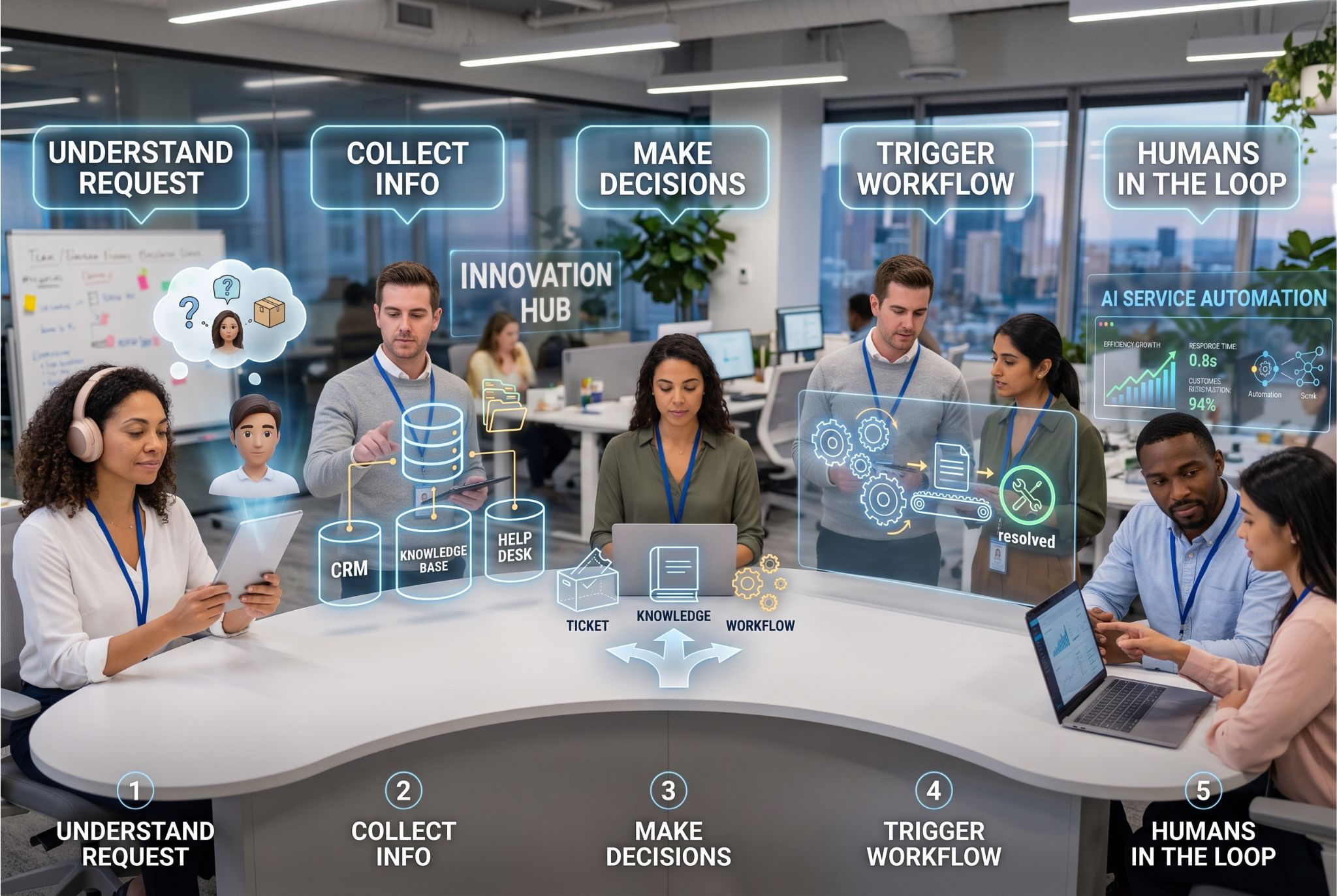
1. Understand the Customer’s Request
The first thing the system must know is what the customer desires. To achieve this, natural language processing can be used to understand customer intent by processing conversational language.
For instance, customers can say:
- “Where can I find my order?”
- “Can I change the way your child is delivered?”
- Help with my account.
- I did not receive my payment.
While customers use different terms, their service needs may be the same. Thus, AI can read and understand the context and intent behind each request. Additionally, intent recognition is used by the automation to determine the next step. Consequently, businesses can direct requests, retrieve information, or initiate specific workflows more efficiently. In conclusion, by gaining insight into customer intent, AI Service Automation can better serve its customers by providing relevant and precise support.
2. Collect the Appropriate Information
Then automation requires accurate and relevant data. The system is required to locate the proper data at the proper time to deliver accurate service. This information can be stored in a knowledge base, CRM, help desk, customer record, or business application. For instance, when a support case needs to reference previous interactions, an automated system can pull information from accounts and orders. But without accurate information, automation can’t provide reliable outcomes. Poor data accuracy and consistency can lead to incorrect answers and poor customer service. As a result, companies need to consider information quality as an integral component of AI Service Automation. Moreover, the team should ensure that the automated systems are based on the latest, relevant, consistent, well-managed, and controlled data. In return, accurate data enables automation to make better decisions and get customer requests resolved promptly.
3. Make Choices for Action or what will Happen Next
Once the customer’s desired action is understood, the system must decide on the best next action. This is where AI analyzes what the customer is looking to achieve, the information available, and the services needed. For instance, some requests may call for a simple answer. Other requests, however, may trigger a specific workflow. When a customer queries on order status, for example, they might require information from an order management system. The system might also need to create a ticket and route it to the right support team due to a technical problem. Thus, they need to understand the various service scenarios and choose the appropriate response or action. Consequently, businesses can avoid unwarranted manhandling and boost service efficiency. This is where service workflow automation comes into the picture, as it links up customer requests with the required processes to streamline them toward resolution.
4. Trigger the Service Workflow
After the system has found the appropriate next step, it can then act. Depending on these business workflows and customer requests, automation can:
- Create a support ticket
- Retrieve customer information
- Update a record
- Send a notification
- Route a request
- Schedule an appointment
- Begin an approval process
- Give a status report
For instance, automation can pull account details before answering a customer’s call. Likewise, it can generate and forward a support ticket for any issue requiring employee assistance. But it will depend on the business process and customer request. Hence, the workflows need to be structured in line with the service objectives. Most of all, automation should do more than throw out a response. Rather, it should help advance each consumer request to a useful end. This helps businesses minimize repetitive, manual work and develop faster, more connected service experiences.
5. Keep Humans in the Loop
However, not every customer request should be fully automated. In some situations, customers need human judgment, empathy, negotiation, or specialized knowledge. For this reason, effective AI customer service should include intelligent escalation. Instead of forcing every interaction through automation, businesses can teach systems when to involve employees. For example, automation can handle routine questions and simple requests. Meanwhile, the system can recognize complex, sensitive, or unusual situations and route them to the appropriate team member.
As a result, employees can focus their time on interactions that require deeper expertise and personal attention.
This creates a more practical service model:
- Automate the routine.
- Escalate the complex.
- Empower the human.
Ultimately, this balanced approach allows businesses to improve efficiency without sacrificing the human connection that customers still value.
Where AI Service Automation Creates the Most Value
The strongest automation opportunities usually involve repetitive, high-volume service work. These tasks can consume significant employee time without requiring constant human judgment.
Automating Repetitive Customer Requests
Businesses frequently receive recurring customer questions, such as questions about business hours, company policies, order status, account details, product availability, and common issues.
While these questions are straightforward, addressing them individually can consume significant employee time, reducing availability to handle more complex customer needs. Automating regular inquiries reduces repetitive tasks and improves service effectiveness. AI tools can direct customers to relevant information, lessening the need for employee intervention. This approach allows service teams to focus on unique, sensitive, or complex issues. Ultimately, firms can provide faster support and enable employees to concentrate on tasks that require an individual touch.
Reducing Service Bottlenecks
As customer demand increases, service teams can quickly face growing backlogs and longer response times. In particular, smaller teams may struggle to process every request quickly while maintaining service quality. However, AI Service Automation can handle routine requests continuously. For example, automation can answer common questions, collect customer information, route requests, and trigger relevant workflows. As a result, teams can reduce repetitive workloads and keep requests moving through the service process. Furthermore, employees can focus on complex issues instead of spending valuable time on routine tasks. Therefore, businesses can create additional service capacity without relying solely on additional staffing. Ultimately, automation helps teams manage changing demand while maintaining a more responsive customer service experience.
Connecting Conversations to Business Actions
The key advantage of AI Service Automation is connecting conversations to concrete business actions. Automation delivers greater value when integrated with systems that support the service experience. For example, if a customer inquires about an account, automation can interpret the request, retrieve relevant information, and provide a personalized response rather than a generic reply. The system can also initiate the next steps by updating records, creating tickets, or forwarding requests to the appropriate team as needed. This approach allows businesses to align real business processes with customer conversations, shifting interactions from automated responses to meaningful service outcomes.
AI Service Automation Use Cases
Businesses can apply AI Service Automation across many service workflows.
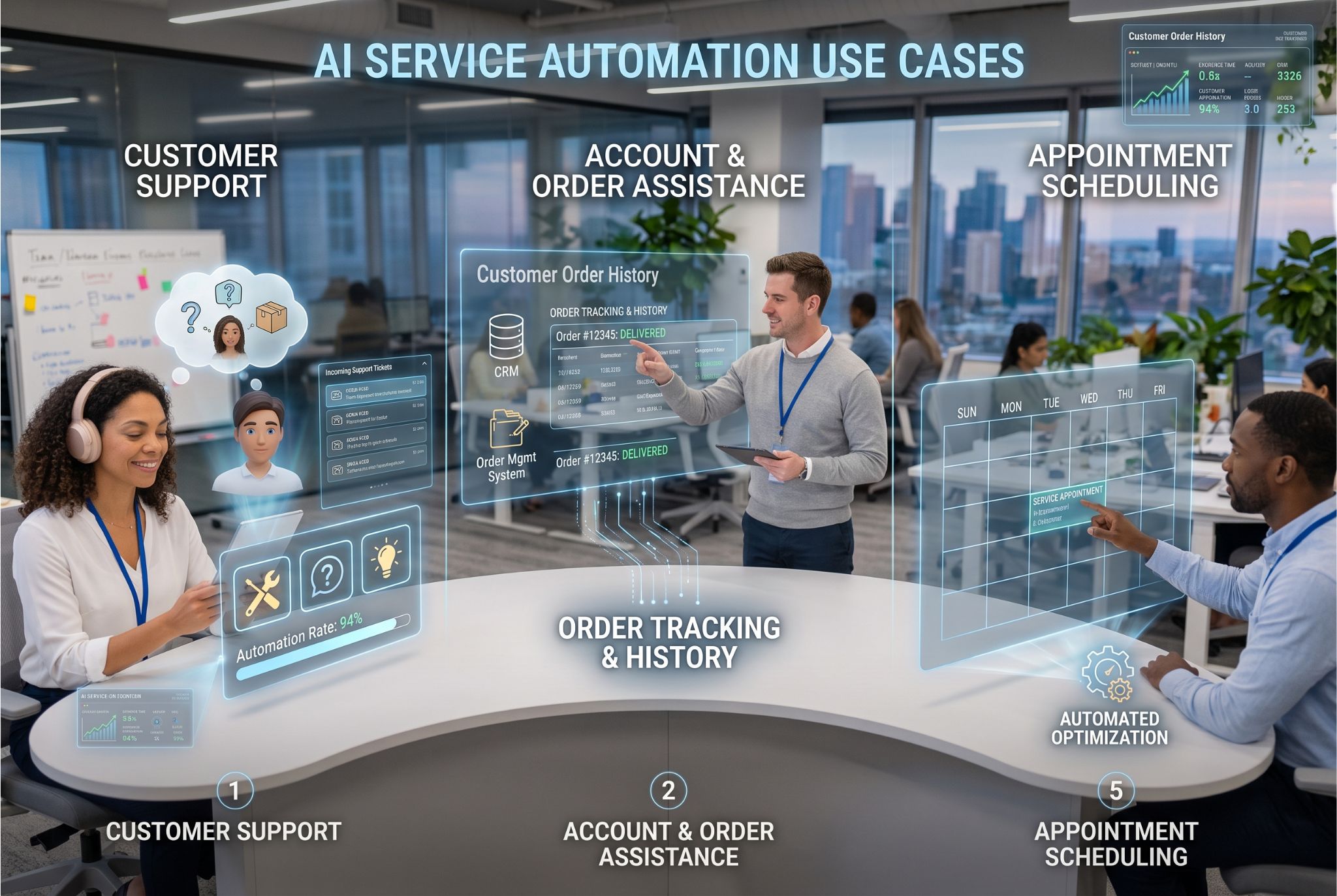
Customer Support Requests
For instance, AI Service Automation can help manage repetitive inquiries, generate support tickets, categorize requests, and assist customers with simple troubleshooting. Customer support teams can automate these tasks to reduce their workload and respond to customers faster. Furthermore, automation can provide customers with support outside of business hours, leading to a more customer-friendly service. This means support staff have more time to address more complex problems that demand human insight. In the end, AI-based customer service can boost team efficiency without compromising their approach to customer interactions.
Account and Order Assistance
Likewise, AI Service Automation can provide customers with information regarding orders, accounts, and transactions. For instance, when the customer wants to check the order status, account details, or recent transactions, they can easily find the information they need. Automation can link customer interactions to business systems and retrieve the correct information through the right integrations. This means a more relevant response from the customer and no need for an employee to search across multiple platforms for a customer’s query. Also, integrated workflows can eliminate the need for back-and-forth communication between customers and service teams. Ultimately, the method can lead to faster, smoother, and more convenient customer service experiences.
Appointment and Scheduling Workflows
Likewise, appointment scheduling will be another valuable opportunity for AI Service Automation. Customers might want to book, modify, and cancel appointments without waiting for employees to respond. Automation can assist with common scheduling functions, rather than having staff handle requests manually. For instance, automation tools could gather the required information, identify suitable options, and guide customers through the relevant process. This means businesses can minimize manual scheduling and help customers fulfill requests faster. Furthermore, workers can devote more time to solving complex scheduling requirements that require individual attention. In the end, automated scheduling can lead to a streamlined and efficient operation and a better service experience.
Conclusion: Turn Customer Service Into a Smarter Operation
Automation should not exist simply because it is popular. Instead, businesses need solutions that deliver measurable returns and improve the customer journey. AI Service Automation connects customer requests with information, decisions, actions, workflows, and human expertise. As a result, companies can create connected service experiences while reducing repetitive work. First, identify repetitive tasks and map each workflow. Then connect the right systems and automate the appropriate steps. Meanwhile, keep employees involved where human expertise adds value. Most importantly, measure performance through resolution rates, customer satisfaction, response times, workflow efficiency, and escalation patterns. These metrics help teams understand automation’s real impact. Ultimately, effective automation helps employees work smarter rather than replacing human support. By implementing solutions like Chatn, companies can build scalable service operations, save time, and focus on meaningful customer interactions. This approach creates faster, more efficient, and more valuable customer service experiences.