
Introduction
Time is one of the most precious resources in any organization. Nevertheless, people spend numerous hours each week arranging meetings, checking their calendars, and sending follow-up emails. Though scheduling may look easy, it can become an invisible productivity obstacle for many. Intersecting calendars, changing priorities, and time zone differences hinder the routine workflow of an organization.
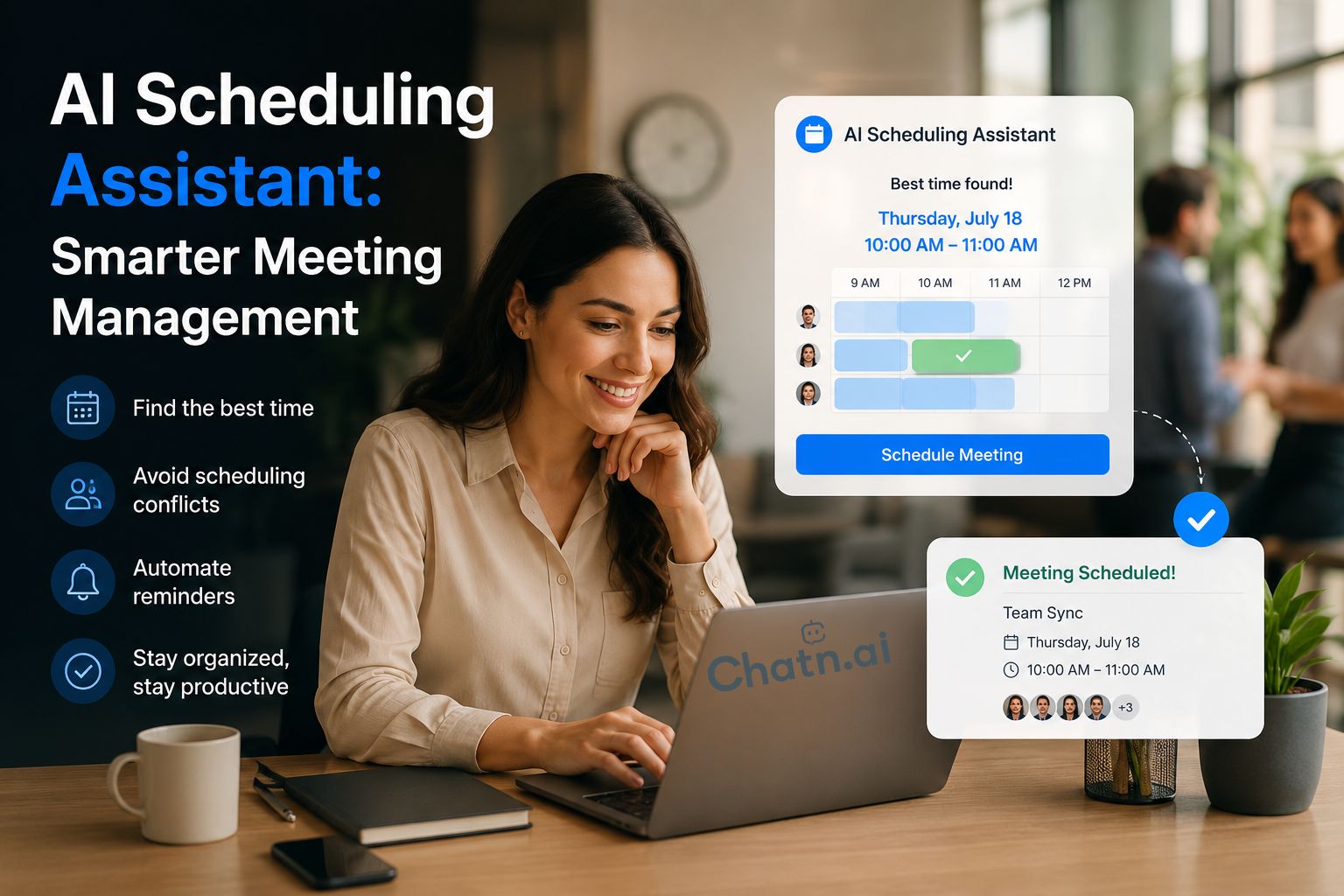
Luckily, an AI Scheduling Assistant handles all repetitive scheduling tasks automatically. Such technology processes scheduling requests, calculates availability, and finds optimal meeting times within seconds. Thanks to that, people save time on calendar management. Also, contemporary intelligent scheduling technologies provide integration with business applications, collaboration tools, and workflow automation software. Thus, they enable smooth scheduling across departments while reducing administrative workload. Whether your organization operates remotely, in a hybrid model, or globally, AI scheduling improves collaboration and productivity. In this article, you will find out how an AI Scheduling Assistant works, how it surpasses manual scheduling, and what role Chatn.ai plays in it.
Why Traditional Scheduling Slows Businesses Down
Scheduling meetings may appear simple, but it involves more than selecting a convenient time. Employees must coordinate calendars, resolve conflicts, confirm participation of key members, and adjust priorities as needed. These tasks consume valuable hours that could be dedicated to strategic or high-level work. As a company grows, scheduling becomes increasingly complex. More employees, multiple departments, hybrid work arrangements, and international offices all add to the challenge. Coordinating schedules and adjusting priorities require greater effort, which slows collaboration and complicates decision-making. To address these challenges, companies need a smarter scheduling system that automates routine processes and enhances coordination. The following sections will examine common scheduling problems and how automation can resolve them.
Manual Calendar Synchronization
There are also employees who manually check their calendars prior to arranging meetings. To accomplish this, they need to switch between several programs, ensure the programs are available, and communicate with all participants individually. Consequently, such a process takes up too much precious time and distracts from productive activities. Furthermore, even small scheduling mistakes cause employees to restart the process. Ultimately, such errors lead to unwanted procrastination and additional workload. As the number of meetings employees conduct increases, this process is becoming less efficient.
Unending Email Conversations
The whole scheduling process always starts from one simple question:
“Are you free next Tuesday?”
But as simple as this question sounds, it usually results in a very long email conversation. People offer various times for the meeting or refuse to join. As a consequence, all these replies have to be analyzed and new proposals coordinated until an agreement is finally reached. What is more, each new email slows the scheduling process even further and makes it more complicated than it should be. Furthermore, coordinating a single meeting can require sending many emails.
Double Bookings and Scheduling Conflicts
Busy individuals have many meetings on their schedules each week. Due to a lack of smart scheduling, scheduling conflicts will soon be inevitable. Due to double bookings, individuals will need to cancel meetings, reorganize their schedules, and alert participants to the changes. In addition, unexpected conflicts will disrupt the flow of work and make it difficult to adhere to the schedule. Meanwhile, employees waste precious time dealing with problems instead of working productively.

What Is an AI Scheduling Assistant?
The AI Scheduling Assistant is a technology that utilizes artificial intelligence to schedule meetings and appointments. It does not require human intervention since it processes calendars, understands natural language, identifies potential conflicts, and determines the best meeting times based on this data. Unlike regular scheduling software, the technology takes into account participant availability, meeting priorities, working hours, and company policies to make recommendations. Thus, for instance, an employee may say, “Schedule a project review with the marketing team next week.” The technology processes the message, finds a good time, sends out invites, and makes the necessary changes automatically. As a result, there is no need for an employee to engage in lengthy email conversations about scheduling. In addition, many AI scheduling assistants integrate with Microsoft Outlook, Google Calendar, Microsoft Teams, Slack, CRM software, and workflow automation software. As a result, it becomes easier to schedule meetings and collaborate within a team. As companies increasingly adopt digital technologies, AI scheduling has become a key productivity tool.
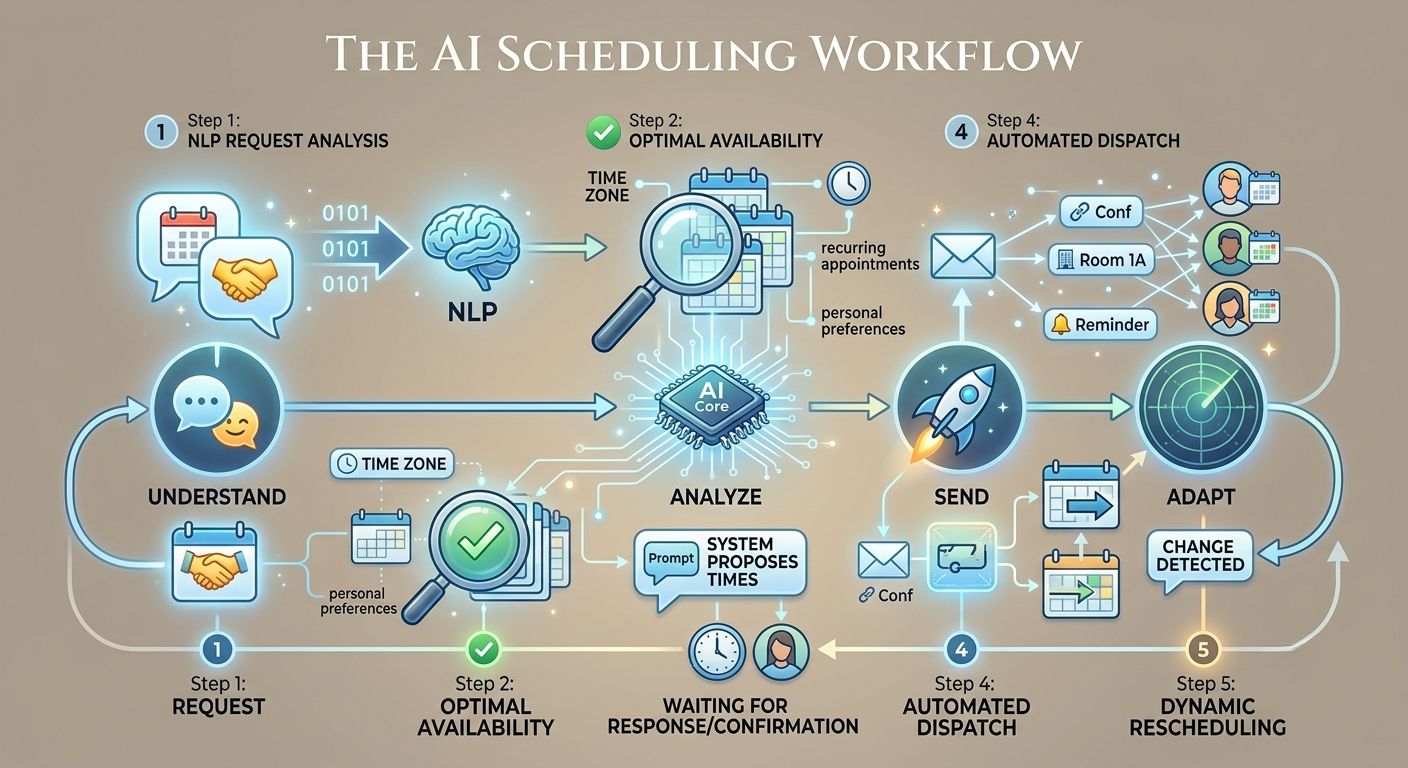
How an AI Scheduling Assistant Works
An AI Scheduling Assistant streamlines scheduling by using artificial intelligence, natural language processing, calendar intelligence, and workflow automation. It analyzes data, identifies optimal meeting times, and automates routine tasks, reducing administrative workloads and increasing efficiency for a simpler user experience.
Although the technology is advanced, the user experience remains simple and intuitive. Employees can schedule meetings using natural language, without complex calendar tools. The assistant manages scheduling in real time, allowing teams to focus on higher-value work. This ensures a smooth process from start to finish. To better understand its capabilities, let’s review how it works.
Step 1: Understand Scheduling Requests
It all starts with a natural conversation. Employees do not have to fill out long scheduling forms; they simply provide a plain-language description of what they need.
They can write, for instance:
For example: “Let’s arrange a client appointment this Friday.
Next week, book a project launch!
“Schedule 30 minutes with our financial team.”
The AI’s next step is to leverage natural language processing (NLP) to examine the request, retrieve pertinent information, and assess scheduling needs. It then identifies the participants, preferred dates, meeting length, meeting places, and the business context without requiring manual entry. Consequently, workers schedule more efficiently and accurately. Besides, this conversational approach sidesteps unnecessary administrative tasks, improves the employee experience, and makes scheduling as easy as talking to someone.
Step 2: Analyze Calendar Availability
When the AI understands the scheduling request, it checks the calendars of all concerned parties. It does not choose the first available time slot, but instead considers some key questions to determine when the best time for a meeting will be:
- Existing meetings
- Working hours
- Time zones
- Recurring appointments
- Personal availability
- Organizational scheduling rules
Next, the assistant processes all this information and decides on the optimum scheduling solution within seconds. Consequently, workers won’t have to deal with the painstaking hassle of manually checking multiple calendars or going through multiple rounds of back-and-forth email to arrange their schedules. Also, calendar synchronization is an integrated function that ensures synchronized schedules are accurate and updated throughout interconnected platforms. This means organizations can minimize scheduling conflicts, enhance coordination, and ensure a smoother scheduling process without friction.
Step 4: Send Invitations Automatically
Once the best time has been determined, the remaining administrative work is done automatically by the AI. Specifically, it:
- Creates calendar events
- Sends meeting invitations
- Shares conferencing links
- Reserves meeting rooms
- Updates participant calendars
- Sends meeting reminders
This means that there are no more repetitive scheduling tasks for employees to do. Also, the AI ensures that each participant receives the correct meeting information when necessary. In addition, automatic updates maintain calendar synchronization when changes are made. This means that organizations can reduce administrative tasks, minimize scheduling inaccuracies, and provide a seamless, efficient meeting experience for all participants.
Step 5: Adapt When Plans Change
Business calendars change often. Meetings shift, priorities evolve, and attendance may change over time. An AI Scheduling Assistant tracks changes and provides instant alerts, eliminating the need for manual updates. When conflicts arise, it automatically proposes new meeting times, updates invitations, and notifies attendees. This helps teams adapt quickly to shifting priorities without interrupting their workflow. This agility helps organizations respond to unexpected business needs while maintaining productivity. Intelligent scheduling is more than a routine administrative task; it is an automated workflow. As a result, employees spend less time on logistics and more time solving problems and delivering customer value.
How Chatn.ai Powers Intelligent Scheduling
Scheduling should support, not hinder, business operations. Chatn.ai enables teams to work efficiently and keep projects on track by combining conversational AI, business system integrations, enterprise knowledge, and workflow automation in a single intelligent platform. Chatn.ai is more than a calendar. It serves as a virtual assistant that allows employees to complete scheduling tasks through conversation. The platform analyzes requests, coordinates schedules, and manages actions in the background, so teams can focus on higher-value work instead of managing calendars. Chatn.ai integrates scheduling within broader business processes, rather than treating it as a separate task. The following sections explain how Chatn.ai delivers intelligent scheduling to improve productivity, collaboration, and efficiency.
Conversational Scheduling
There shouldn’t be too many menus or long scheduling forms for the employees to go through. Rather, Chatn.ai allows users to book appointments in natural language. For instance, a worker may just ask:
Get a business review next Wednesday with the finance department on a quarterly basis.
After the request is made, Chatn.ai understands it, identifies the participants, checks whether the calendar is available, and recommends the most suitable time for the meeting. It then sets up the meeting and automates scheduling with minimal effort from the user. Consequently, staff members can schedule jobs more quickly, reduce superfluous administrative work, and dedicate more time to higher-value duties. Moreover, this chat experience streamlines scheduling and boosts collaboration and productivity in the workplace.
Enterprise Knowledge Integration
The availability of the calendar is a factor in scheduling, but not always the only one. Project schedules, departmental priorities, client commitments, and company policies also need to be taken into account before an organization decides when to hold its meeting. To mitigate these issues, Chatn.ai can link scheduling with enterprise knowledge, enabling its staff to make more informed decisions. Users get intelligent recommendations of relevant information without having to search on multiple systems. Consequently, staff members schedule with greater speed and confidence, with less effort. Moreover, this method allows teams to focus on the most important meetings, enhance teamwork, and ensure everyone’s availability aligns with the organization’s objectives. As a result, all meetings are more effective, efficient, and focused on business goals.
Workflow Automation
Today’s scheduling is more than just about booking meetings. In many instances, the organization will need to inform stakeholders, assign follow-up actions, create project documentation, or change project systems after scheduling an event. To simplify these processes,Chatn.ai automates repetitive work tasks and integrates scheduling with broader business operations. The platform automatically takes the necessary steps once employees create a meeting. Therefore, the teams have fewer repetitive administrative tasks, fewer delays, and greater operational efficiency. Moreover, automated workflows ensure consistency of business processes, reduce human error, and align all scheduling events with the organization’s goals.
Best Practices for Implementing an AI Scheduling Assistant
Deploying an AI Scheduling Assistant requires more than installing new software. Organizations achieve the best results by aligning intelligent scheduling with existing workflows, employee needs, and business objectives.
The following best practices help maximize long-term value:
Recognize repetitive scheduling tasks.
First, assess employees’ existing meeting and appointment scheduling. Next, look at activities that are repeated, like comparing calendars, sending invitations, confirming attendance, and rescheduling meetings. In many organizations, these routine jobs waste hours and hours of productive time and increase administrative burden. Fortunately, they also have the highest potential for automation. This will help identify common scheduling bottlenecks so that processes that provide the quickest productivity benefits can be prioritized. Consequently, teams experience less manual work, smoother scheduling, and employees have more time to focus on more valuable tasks.
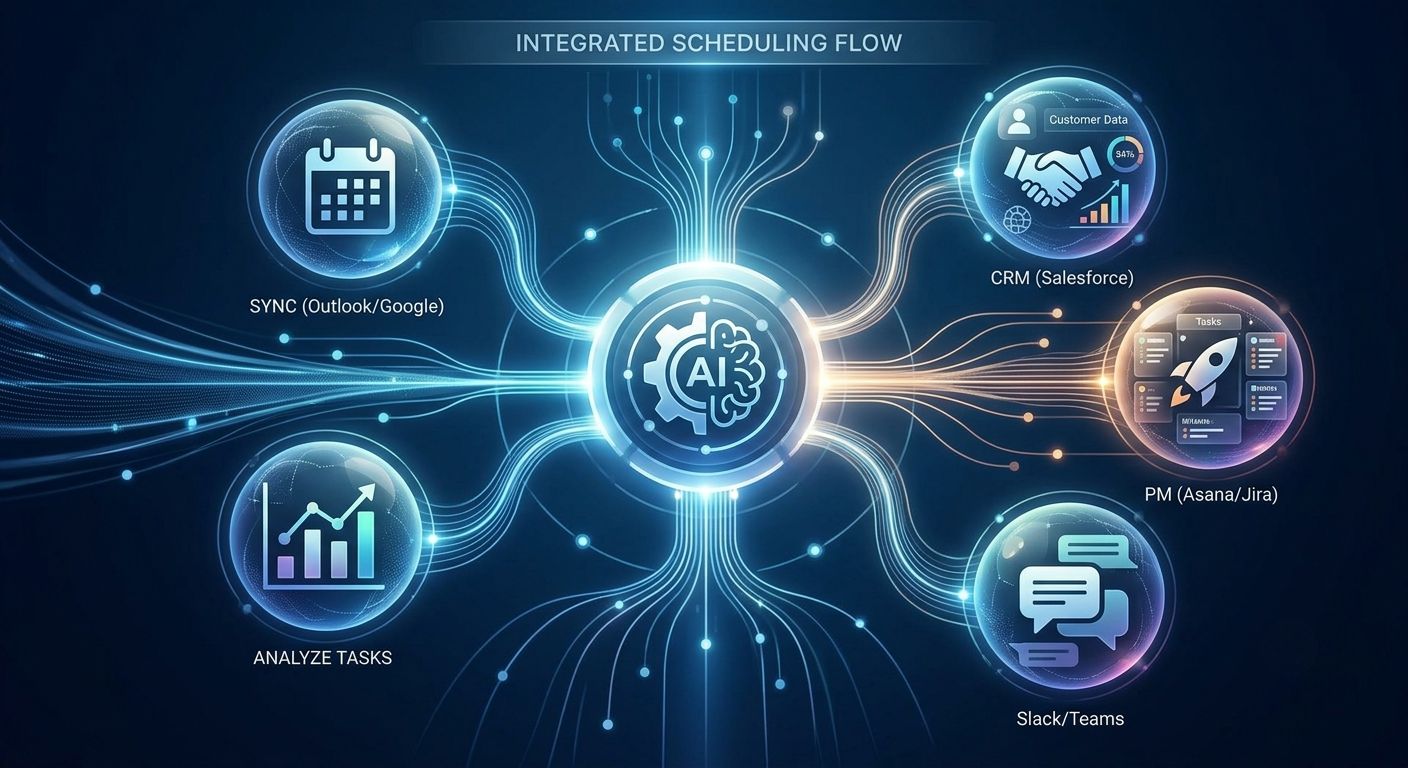
Link with Existing Calendars
First of all, you should link your AI Scheduling Assistant with existing calendar services. For instance, by linking calendar services like Microsoft Outlook and Google Calendar, you will provide the assistant with current availability data and enable it to find the most accurate meeting times. What is more important, linked calendars keep schedules up to date across all connected calendar services; therefore, the likelihood of schedule conflicts or double-booking will be minimized. Thus, employees will spend less time on manual comparison of their schedules and focus on productive activities.
Integration of Business Applications
It is clear that scheduling is far more useful when used in combination with regular business apps. To illustrate, companies can combine an AI Scheduling Assistant with CRM applications, HR tools, project management tools, customer service platforms, and collaboration apps. In such a way, businesses make the working process more integrated and effective. Thus, workers can do more without switching between apps and manually copying information. Also, the integration of applications increases data precision, simplifies communication, and helps avoid routine administrative work.
Conclusion
In today’s modern organizations, it is essential not to waste valuable time on manual scheduling. Although meeting coordination is a small task for someone, it often leads to delays, additional administrative work, and decreased productivity for the company as a whole. Luckily, the solution to this problem is called AI Scheduling Assistant, which automates scheduling, avoids calendar conflicts, and facilitates collaboration within the team.
Further, smart scheduling does much more than arrange meetings for people. Instead, it is contextual, adaptable, integrated with business systems, and optimized for workflows. Moreover, it helps to minimize additional administration and increase coordination between teams. Therefore, employees have more time for strategic work and innovations rather than working with calendars all day long. Intelligent scheduling would be an indispensable tool in the future workplace environment, as companies adopt digital transformation. Companies that embrace intelligent scheduling now will increase their productivity, improve employees’ experience, and make sound decisions faster.
Chatn.ai elevates the concept of intelligent scheduling, which includes not only workflow automation but also conversational artificial intelligence, enterprise knowledge management, and business system integration, all in one platform. Unlike other calendar organizers, Chatn.ai helps companies create smart workflows to increase productivity across all departments. In essence, an AI Scheduling Assistant is much more than just calendar management software.