
Introduction: Why Businesses Need Smarter Workflows
Business tasks rarely stay quick and simple. Challenges often arise at various process stages. Employees transfer information between systems, review requests, update records, send notifications, and wait for approvals. Over time, these repetitive tasks lead to inefficiencies and waste valuable time. Traditional workflow automation addresses some challenges, but fixed rules often fail when information changes, requests grow complex, or unexpected situations occur. AI Workflow Automation can help by processing information, determining next steps, triggering tasks, and connecting workflow stages. Businesses can also move beyond automating individual tasks by building intelligent workflows that connect entire processes from start to finish. This reduces manual coordination, increases efficiency, and allows employees to focus on higher-value work. In this article, we explore AI Workflow Automation, its business applications, and practical steps for successful implementation.
What Is AI Workflow Automation?
AI Workflow Automation combines artificial intelligence with automated business processes. Unlike traditional automation, it helps organizations manage unstructured information and handle requests. Traditional workflow automation relies on fixed rules.
For example, a system might route every request to Team A. This approach works when requests follow the same procedure. However, business processes often involve varied requests, unexpected situations, and changing requirements. Requests can arrive through emails, forms, documents, chats, or internal systems. Therefore, each request may require a different response.
Instead of following fixed rules, AI analyzes information, understands intent, and supports decisions about the next action. For example, an AI-powered workflow can receive and interpret a request, retrieve relevant information, select the appropriate workflow, trigger the next action, update connected systems, notify the employee, and handle exceptions when necessary.
Ultimately, AI Workflow Automation integrates information, decisions, tasks, systems, and outcomes into a single process, reducing manual coordination and improving consistency.
How Does AI Workflow Automation Work?
AI workflow automation typically connects several stages of a business process. The exact architecture varies by organization. However, the underlying process often follows a similar pattern.
After the system receives the information, it prepares the data for the next step.
1. Capture Information
First, the workflow collects relevant data from business sources such as emails, forms, documents, customer interactions, CRM systems, business applications, and internal databases. Once the system receives the information, it prepares the data for the next step. To ensure effective action, the workflow depends on accurate and relevant information. Organizations should integrate reliable data sources and establish clear procedures for data collection. This foundation allows the workflow to process requests and operate efficiently.
2. Understand the Information
Next, AI will analyze the provided information and determine the request. At this level, it can find relevant information, categorize inquiries, summarize text, and understand a user’s purpose. For instance, an incoming request can contain multiple pieces of information. Then, AI understands the request and determines the information needed for the next step in the process. This means the workflow can act on the request as is, rather than relying on fixed rules. Additionally, AI enables the system to handle diverse data inputs and direct each request to the right course of action.
3. Determine the Next Step
When AI comprehends the request, the system can decide on the next action. Given what it has learned, it can choose the right action and proceed with the workflow.
For instance, during the workflow:
- Escalate to the appropriate team.
- Create a new task.
- Update a record.
- Request missing information.
- Trigger another workflow.
- Notify an employee.
- Escalate an exception.
Moreover, the system can fine-tune the process according to the data it receives. Consequently, the process can be adaptive, taking different routes for each request rather than following a single route.
In the end, this adaptability simplifies how businesses handle more complex processes.
4. Execute the Action
Automation can act without requiring manual intervention once the system has identified the appropriate action. For instance, it may be possible to update a business record upon receipt of a request. It can also assign a task to an employee, notify, or initiate another workflow. Teams can now work towards a goal without having to coordinate every step. Furthermore, automated action execution minimizes repetitive tasks and ensures smooth processes. Finally, this enables workers to concentrate more on their work and skills.
5. Monitor and Escalate
Not all workflows should be fully automated. Staff may need to review information, provide approval, or make decisions. Effective AI workflow automation requires proper monitoring and escalation procedures. For example, if information is missing or an unusual scenario occurs, the system can notify the appropriate person for review. Teams can define specific conditions for human intervention. This enables staff to manage exceptions while automation handles routine tasks. This approach creates a practical balance between automation and human decision-making, helping organizations maintain control and improve workflow efficiency.

Why AI Workflow Automation Matters for Modern Businesses
Businesses often look at automation through the lens of time savings. However, the value goes beyond reducing hours spent on repetitive work.
Reduce Manual Coordination
One, staff members often have to coordinate routine tasks for much of their time. They monitor statuses, send reminders, transfer info between systems, and decide who should take the next action. But when teams process many requests, these activities can take a lot of time! AI Workflow Automation can automate many of these coordination tasks and ensure business processes continue to run. For instance, AI can handle requests, update records, set up notifications, and assign tasks to users based on workflow needs. This means that staff allocate less time to basic coordination. Of course, they can concentrate their expertise on complex problems, important decisions, and higher-value activities instead. In the end, AI Workflow Automation makes it easier to work with teams — and ensure people stay focused on what matters.
Improve Process Consistency
Firstly, there is a risk of manual processes being inconsistent, particularly because multiple staff members handle the same requests differently. Because of this, teams can take different approaches, which can impact efficiency and service quality. In contrast, automated workflows have explicit rules and processes that are applied to a series of similar tasks. Additionally, AI Workflow Automation can manage diverse requests and keep the workflow organized. Thus, organizations can set their operational standards and eliminate unnecessary process variations. In the end, consistency boosts team productivity, upholds quality standards, and ensures smoother business operations.
Reduce Process Delays
In most cases, actions become stalled when people wait for information, approvals, or task assignments. Therefore, even simple processes can take longer than needed. AI Workflow Automation allows businesses to automate workflows by sending notifications and initiating the next step. In addition, the system can advance the work as soon as the employees or systems perform the necessary action. Thus, the teams are not delayed waiting between process steps. In contrast, workers can concentrate on the real work they create, while automation handles routine coordination. Ultimately, faster workflows help organizations respond quickly, reduce bottlenecks, and improve business process efficiency.
Where Can Businesses Use AI Workflow Automation?
AI workflow automation can support many business processes. The strongest opportunities usually involve repetitive work combined with changing information.
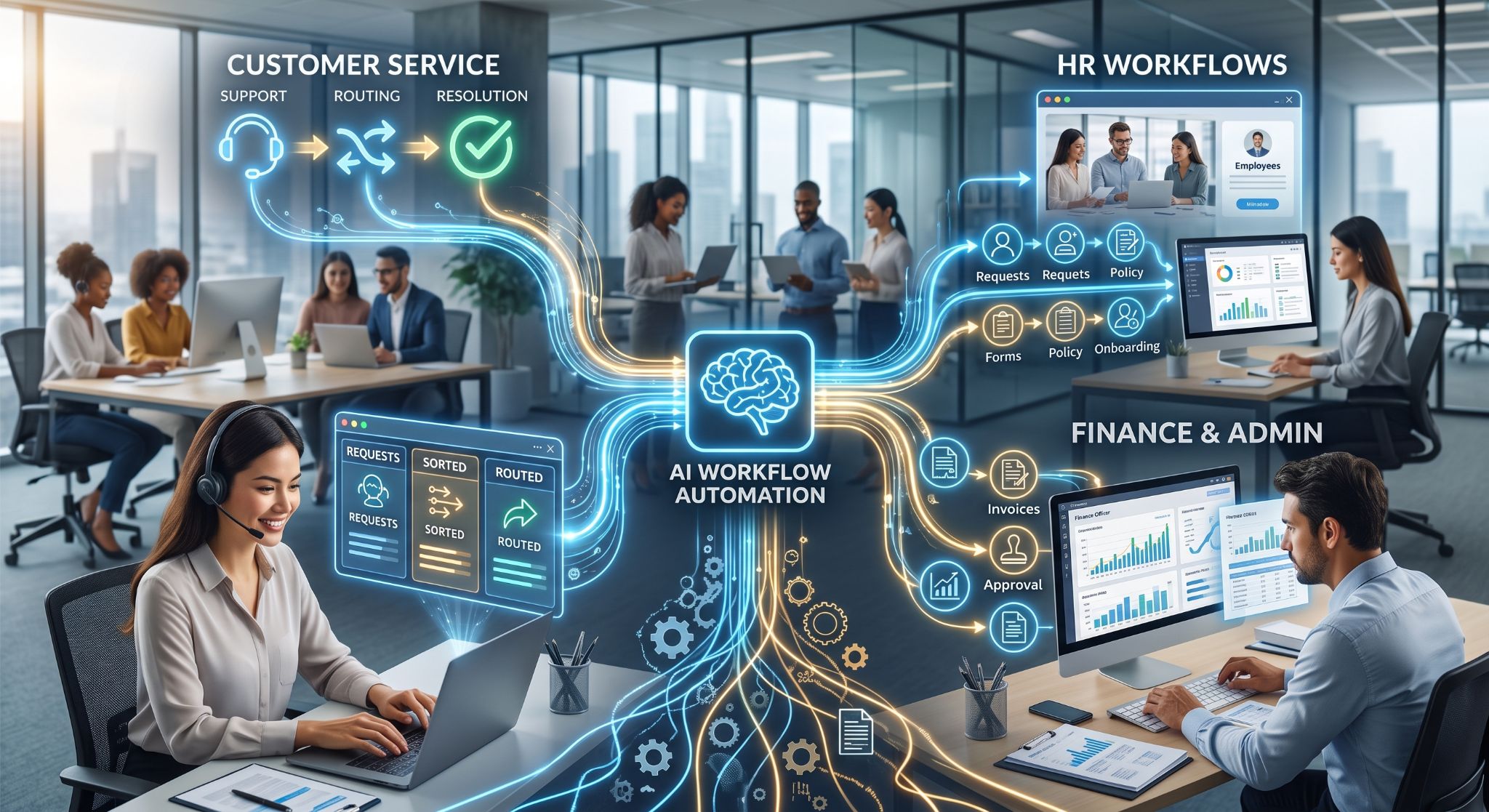
Customer Service Workflows
For instance, a customer service team processes numerous requests each day. However, as the number of requests increases, employees end up spending time manually categorizing and processing them.
AI Workflow Automation allows companies to categorize requests and determine the next required actions. For example, AI can detect the client’s purpose and route their request to the relevant department. Furthermore, the workflow could gather any missing data before the employee is assigned the case. Therefore, employees will have more complete requests and spend less time requesting additional information from clients.
Thus, AI-based workflows could prevent unnecessary back-and-forth communication and process customer service requests more effectively. Finally, automation could help employees focus on cases that require human intervention.
Employee and HR Workflows
Just like that, there are many repetitive requests from internal teams. For example, employees might require some knowledge about the company policy, onboarding, approvals, or internal processes.
AI Workflow Automation enables HR teams to capture those requests and route them to the appropriate process. Also, AI will be able to understand the meaning of each request and suggest the next steps. Therefore, employees will receive prompt assistance without additional burden on the HR team. In addition, HR teams will have less time for coordination and more time to focus on employees and strategic goals.
In conclusion, smart workflows can help HR teams build a better employee experience.
Finance and Administrative Workflows
Similarly, financial and administrative departments handle a large volume of repetitive information each day. For instance, employees could be involved in processing requests, reviewing documents, verifying data, approving processes, sending notifications, and recording the updates.
At the same time, manual processes will slow employees down and increase the likelihood of mistakes. In the case of AI Workflow Automation, departments will be able to analyze incoming information and first determine the required process. What is more, artificial intelligence will assist in identifying important details, organizing information, and routing the request to the appropriate process. Consequently, financial and administrative departments will eliminate repetitive actions and keep their processes running.
How to Identify Processes Ready for AI Workflow Automation
Not every workflow requires AI. Organizations should first identify where automation can create measurable value.
Repetitive Processes Search
The first step is to identify the processes employees perform most often. Pay special attention to those processes where employees must repeat the same actions all day long. Consequently, processes performed at high volume offer more opportunities for AI Workflow Automation. Furthermore, automating these processes can relieve employees’ workload.
Find Manual Handoffs
Now, look for places where people are frequently shifting information back and forth between different departments and systems. In many cases, these manual handoffs slow down processes and increase the likelihood of mistakes. Also, people will have to duplicate and confirm the information and alert other departments before proceeding with their tasks. Therefore, these inefficient processes can lead to delays. That is why firms must identify these frequent handoffs and determine how AI Workflow Automation can help connect these processes.
Identify Process Bottlenecks
Next, find out which part of the process takes the longest to wait. For instance, typical process bottlenecks can occur during approval, data entry, information gathering, or task assignment.
Moreover, find steps in the process where workers are waiting for an answer, analyzing information, or repeating actions. Consequently, all that makes the whole process slower. That is why companies need to detect bottlenecks before using AI Workflow Automation technology.
How to Implement AI Workflow Automation Successfully
Successful automation starts with the process. Technology should come second.
Map the Existing Workflow
Initially, map all existing stages without making any changes. It will help teams understand what happens at each stage and how they progress from one to the next.
Determine:
- Inputs
- Actions
- Decisions
- Handoffs
- Systems
- Approvals
- Exceptions
- Outputs
Additionally, determine the responsible people for each stage and the places where bottlenecks usually occur. This strategy allows teams to have a complete picture of the process and its possible improvement.
Eliminate Ineffective Stages
Afterward, evaluate each stage and assess whether it provides value. One should not automate ineffective stages just because they already exist. Rather than that, one should eliminate unnecessary actions, simplify complicated stages, and avoid handoffs. After that, automate only valuable stages. Thus, companies will be able to optimize their processes before AI Workflow Automation.
Choose the Right Automation Opportunities
Once the team evaluates the current workflow, they can identify the processes that need improvement. First, select the workflows that have clear, measurable issues such as manual labor, delays, and repetition.
For instance, teams may select processes that involve workers repeating certain actions. Also, they can select workflows in which delays regularly influence productivity or customer service. As a result, organizations will be able to focus their automation efforts on the areas where it really counts. In addition, measurable workflows facilitate evaluation of the effectiveness of AI Workflow Automation.
The Future of AI Workflow Automation
AI Workflow Automation is now moving beyond merely executing individual tasks. However, businesses are now starting to interconnect workflows that involve many actions across various processes. Not only does an intelligent system answer a certain request, but it can help teams move each request toward completion.
See for yourself how this works:
Understand → Decide → Act → Verify → Escalate → Complete
In this way, it creates a much more connected operating system. What’s more, it means that automation changes the entire paradigm of thinking within organizations.
The point is not:
“What task do we have to automate?”
Instead, companies can ask:
“What process do we have to make better from start to finish?”
It enables organizations to think in terms of results rather than separate actions. At the same time, humans still matter. AI can process vast amounts of data, while people rely on their judgment, accountability, creativity, and empathy. For this reason, organizations do not have to aim at having a completely autonomous process. On the contrary, companies can leverage the combination of human knowledge and AI capabilities.
How Chatn Supports Smarter Workflow Automation
For Chatn, our approach is based on a process-centric perspective to workflow automation. Rather than viewing automation as a set of separate activities, we help companies analyze the entire workflow.
First, companies may identify where information is received in the process, where decisions are made, and which steps lead to delays. Secondly, it will be easier for them to see which steps may benefit from intelligent automation. In this way, businesses can connect processes rather than automate actions separately. Also, Chatn can help to decrease manual coordination and create more efficient processes and improved workflow visibility. The most important point is that good automation must support those who work with the process. That is why businesses must use technology not only to eliminate unnecessary work but also to avoid extra complexity.
Overall, this process perspective keeps AI Workflow Automation close to business results and focuses on people within automation.
Conclusion: Build Workflows That Move Work Forward
Companies should implement automation only when it addresses specific problems and delivers clear value, rather than adopting it solely due to technological capability. AI workflow automation enables organizations to connect information, decisions, tasks, systems, and people. By optimizing entire processes rather than isolated tasks, companies can strengthen connections across workflow steps.
Companies should first understand their existing workflows. They can then identify bottlenecks, remove unnecessary steps, integrate systems, and automate actions, while maintaining oversight of the entire process.
Companies should track results and use insights to refine their workflows. Effective automation should deliver improvements without adding unnecessary complexity. The objective is not simply to increase automation, but to implement better workflows that advance organizational goals. Ultimately, the right solution will help companies achieve faster, more efficient, and smarter operations.
Know the process. Improve the workflow. Automate the right actions. Track the results.