

Introduction
Today’s work environment demands fast, efficient internal services. Employees expect quick responses, easy access to information, and timely support. However, traditional service desks often cannot meet these rising expectations. Meanwhile, IT departments face growing volumes of devices, applications, and support requests. As ticket numbers increase, processing slows, costs rise, and support teams face greater challenges. Instead of hiring additional staff, many companies now implement the AI Service Desk. Unlike traditional service desks, it automates routine tasks to maintain high service quality. The AI Service Desk understands employee queries, retrieves information, automates workflows, and supports problem-solving. This enables faster assistance for employees and allows IT specialists to focus on higher-priority tasks. The AI also learns from each interaction, improving its recommendations and providing more personalized support. This guide will explain the AI Service Desk, its advantages over conventional solutions, and how it delivers smarter enterprise support.
What Is an AI Service Desk?
An AI Service Desk is an intelligent platform that manages internal service requests using AI. By integrating conversational AI, enterprise knowledge, workflow automation, and system integrations, it resolves issues efficiently. This allows organizations to provide faster support and reduce manual workloads. Instead of searching lengthy documents or waiting for ticket responses, employees use an AI-powered assistant that understands their intent and provides accurate answers within seconds. This enables faster issue resolution and helps maintain productivity throughout the workday.
For example, employees might ask:
- “How do I reset my password?”
- “Can I request access to Salesforce?”
- “Where can I find our remote work policy?”
Rather than generating unnecessary tickets, the AI Service Desk instantly retrieves reliable information or automates routine tasks when possible. It manages repetitive requests consistently, allowing support teams to focus on complex issues and provide higher-value support.
More Than Just a Chatbot
Many assume an AI Service Desk is just another chatbot. While conversational AI is important, modern service desks offer advanced capabilities. They understand user intent, access enterprise knowledge, automate workflows, and support complex business processes. This enables organizations to deliver faster, more accurate, and consistent support.
An AI Service Desk can understand natural language requests.
- An AI Service Desk can search enterprise knowledge bases instantly.
- An AI Service Desk can automate repetitive service workflows.
- An AI Service Desk can route complex issues to the appropriate teams.
- An AI Service Desk can integrate with existing business applications.
- An AI Service Desk can continuously learn from employee interactions.
By combining these capabilities, organizations reduce manual workloads, improve service quality, and increase operational efficiency. Employees receive accurate assistance without switching between systems or waiting for manual responses. Rather than navigating multiple portals or submitting unnecessary tickets, users receive personalized support through a single, natural conversation. This simplifies the support experience and enables both employees and IT teams to work more efficiently.
Why Traditional Service Desks Can No Longer Keep Up
While service desks have been a staple for companies, today’s digital workspaces demand greater agility and intelligence than manual processes offer. As technology evolves and employee needs increase, service desks face higher volumes of requests while maintaining service quality. Traditional service desks often cannot keep pace, and manual processes slow response times and increase the IT department’s workload. These challenges highlight the limitations of traditional service desks.
Increase in Ticket Volumes
Every new piece of software, cloud system, or process will increase the number of tickets. As companies adopt more technology, ticket volume increases rapidly, requiring much more effort from the IT department. For instance, requests for password resets, software installations, approvals, policy-related inquiries, and troubleshooting inquiries will come in all day long. Thus, IT support often struggles to manage the increasing volume of tickets at a high pace. Besides, such repeated actions consume time and resources that might otherwise have been used for something else. Hence, experienced IT specialists will spend their days solving routine tasks that could easily be automated by AI systems.
Long Resolving Times
The modern workforce expects the same level of fast, smooth interaction on the job as they experience with their consumer technologies. Nevertheless, waiting hours or even days for any kind of help decreases efficiency and leads to frustration. Regrettably, conventional ticket queues often prolong even simple requests, as support specialists must handle them manually. Thus, because they handle many routine requests, IT specialists do not have enough time to resolve complex cases. As a result, important issues remain unresolved for an extended period. This, in turn, may affect business processes and employee satisfaction.
Knowledge Silos
It is possible that crucial data is dispersed across different platforms, making it hard to get the correct answer promptly. To do so, the support team needs to search documentation, the knowledge base, the shared drive, tickets, and the internal wiki for the required information. This slows down interactions, makes information searches inefficient, and creates opportunities for inconsistencies. In addition, employees often struggle to find the required information independently, which leads to more support requests and tickets for minor issues. Hence, a company requires a unified AI-based solution that integrates knowledge and provides immediate answers.

Working of an AI Service Desk
Although artificial intelligence may appear complex, an AI Service Desk provides straightforward, intuitive support for employees. Multiple AI components work together to analyze requests, access reliable information, automate processes, and complete support tasks. As a result, employees receive faster assistance, and companies manage support operations more efficiently. The AI also reviews conversations to deliver more accurate responses and boost future processes. This enables businesses to resolve issues quickly, automate tasks, and improve the employee experience. The following are the key steps in how an AI Service Desk operates.
Step 1: Employees Pose Questions Naturally
It all starts with a simple question posed by an employee. Without going through a difficult process of working with cumbersome service portals or using several different platforms, employees pose their questions in natural, normal speech. For instance, they would say something like:
- “I’m unable to gain access to Microsoft Teams.”
- “I need a new laptop.”
- “How do I access the VPN?”
- “Can I ask for access to software?”
In doing so, employees not only get help faster but also avoid having to learn cumbersome processes or fill out long forms.
Step 2: Understanding the Employee’s Intention
In this step, natural language processing (NLP) is employed to understand the employee’s request by analyzing its intent rather than relying on a mere keyword-matching technique. By doing so, the system can identify the user’s intentions and context, as well as the expected outcomes. Thus, the AI can distinguish between similar requests and suggest the appropriate solution to the employee. In addition, the system takes the conversation context into account to provide a personalized response. As a result, employees can get quicker, more accurate help without having to repeatedly clarify and explain their requests.
Step 3: AI Immediately Retrieves Enterprise Knowledge
Once the AI comprehends the employee’s query, it will immediately retrieve enterprise knowledge from credible sources and present the most relevant data. The sources might include:
- Internal knowledge base
- IT documents
- HR policies
- Employee handbooks
- SOPs
- Previous customer service interactions
- FAQs
Rather than presenting a series of dozens of documents for the employee to sort through, the AI will present precise, contextual responses to the question. Therefore, employees will be able to access the information they need quickly. What is more, customer service representatives will provide consistent responses because they will all draw on the same trusted sources.
Step 4: AI Automates Routine Processes
Many employee requests require more than just information. An AI Service Desk automates common tasks to manage them efficiently, such as:
- Password resets
- Unlocking user accounts
- Requests for software access
- Provisioning devices
- Configuration of the virtual private network (VPN)
- Approvals
- Onboarding tasks for employees
Rather than sending all requests to support staff, an AI system completes these tasks automatically. Employees receive faster assistance, while support teams can focus on complex issues. Automation improves both efficiency and response times.
Step 5: AI Amplifies Difficulties in Intelligent Ways
Some issues require both automation and human expertise. The AI Service Desk routes requests to the appropriate support specialist when necessary. Rather than simply forwarding a ticket, the system provides relevant context, including conversation history, collected information, and potential solutions. This allows support professionals to address problems immediately, without asking employees to repeat details. As a result, this step reduces delays, improves collaboration, and improves the support process.

What Features Should You Look for in an AI Service Desk?
AI Service Desks vary in the extent to which they automate. Some offer basic conversational tools, while others use advanced automation to improve support. Companies should assess each platform’s features before investing. The right solution can boost support effectiveness, staff satisfaction, and return on investment.
An effective AI Service Desk goes beyond handling initial queries. It should first automate workflows, then deliver accurate information, integrate with existing systems, and assist staff. It must also adapt to evolving business needs and scale accordingly. These features help businesses improve efficiency, reduce costs, and accelerate support. Below are key features to expect from an AI Service Desk.
Natural Language Understanding
Employees should be able to communicate in natural language instead of memorizing commands or selecting from limited options. Choose an AI Service Desk that understands natural language, interprets intent, and responds effectively to conversational queries. Advanced AI systems go beyond keyword matching by recognizing context, meaning, and conversation history to deliver faster, more accurate responses. Natural language understanding makes support services more intuitive by enabling more human-like interactions between the AI system and employees. As a result, employees are more likely to use self-service, resolve issues quickly, and submit fewer irrelevant support requests.
Enterprise Knowledge Search
The efficient AI Service Desk must gather accurate data from legitimate enterprise knowledge sources in seconds. Instead of forcing workers to browse through various tools to find the information they need, the system should immediately find and present relevant data as they interact with an employee. This includes:
- Internal knowledge base
- IT documentation
- HR policy manuals
- Employee handbook
- SOP manuals
- Prior support cases
- FAQ’s
Instead of delivering large volumes of documents to employees, the AI provides the right answers in the conversation itself. As a consequence, employees can find the necessary information much more quickly and get back to work. Moreover, customer service becomes more uniform because everyone gets the same information from the same legitimate sources.
Intelligent Workflow Automation
Information alone may not resolve every support request. Your AI Service Desk should automate repetitive workflows end-to-end, enabling employees to complete routine tasks without waiting for manual assistance. This approach eliminates the need for support technicians to manage each routine request, as the system handles them automatically.
Typical examples of automated workflows are:
- Password resetting
- Access to software request
- Device provisioning
- VPN setup
- Approvals routing
- Onboarding of employees
- Unlocks of accounts
Employees receive timely support without delays, while IT staff can focus on higher-value tasks instead of routine manual work. Intelligent workflow automation also ensures processes are consistent, reliable, and efficient, resulting in improved business performance and a better employee support experience.
Best Practices for Implementing an AI Service Desk
Successful implementation requires more than deploying new technology. Instead, organizations should build a strategy that aligns AI with business goals and employee needs. The following best practices help maximize long-term success.
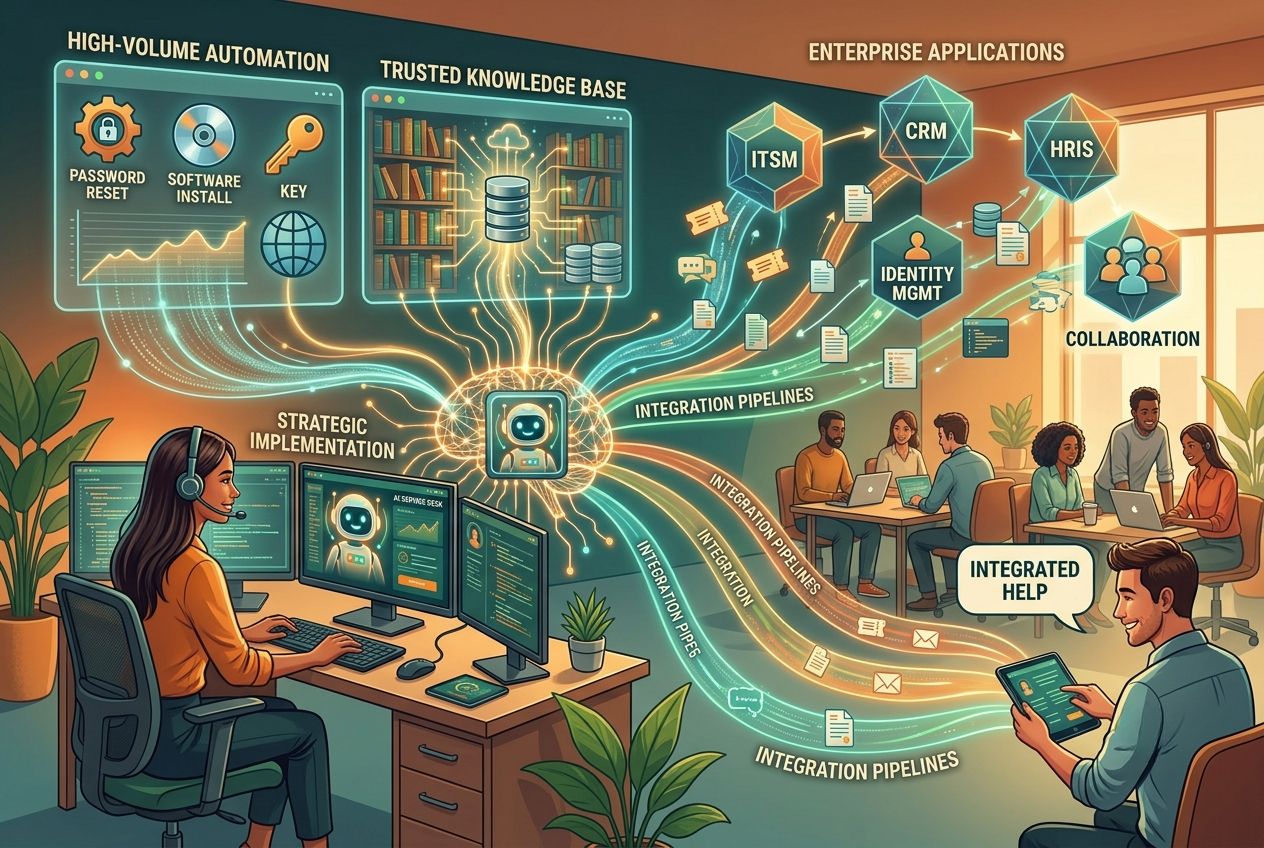
Begin with the High-Volume Tasks
Identify and automate repetitive tasks that require significant support resources. Prioritize high-volume tasks that provide immediate value instead of automating all processes simultaneously. Examples include:
- Password reset
- VPN access
- Software installation
- Policies
- Access requests
Automating high-volume tasks reduces ticket volume, accelerates response times, and improves employee satisfaction. A phased approach allows IT teams to assess performance, refine workflows, and develop expertise with the AI Service Desk solution. This enables support teams to focus on strategic initiatives and deliver greater value.
Create a Trusted Knowledge Base
An AI Service Desk’s efficiency depends on the quality of available information. Companies should maintain a trusted, up-to-date knowledge base so the AI consistently delivers accurate responses to employee inquiries. Structured knowledge improves accuracy, prevents misinformation, and builds employee confidence in the system. As a result, employees are more likely to use self-service, reducing irrelevant support requests and allowing help desks to focus on complex issues.
Integration With Existing Systems
Avoid developing a stand-alone system that operates separately from your existing technology. Instead, integrate your AI Service Desk with the enterprise applications employees use daily. Connecting systems such as IT service management (ITSM), customer relationship management (CRM), human resources (HR), identity management, and collaboration tools promotes organizational cohesion. Integration also reduces redundancy, saves time on data entry, and provides your AI with accurate information from multiple sources. Employees receive fast, personalized support without switching applications, while support teams benefit from greater efficiency, consistency, and effectiveness.
Conclusion
As organizations pursue digital transformation, employees expect faster and higher-quality services. However, rising ticket volumes and complexity often overwhelm traditional service desks. To address these challenges without increasing workload, organizations need smarter solutions.
An AI Service Desk addresses these issues by leveraging conversational AI, enterprise knowledge, and intelligent workflow automation. This approach enables faster issue resolution, cost savings, and greater employee ownership, while allowing IT teams to focus on strategic initiatives. Solutions such as Chatn.ai further enhance consistency and personalization for users across departments by integrating enterprise knowledge with intelligent automation.